
Taxes
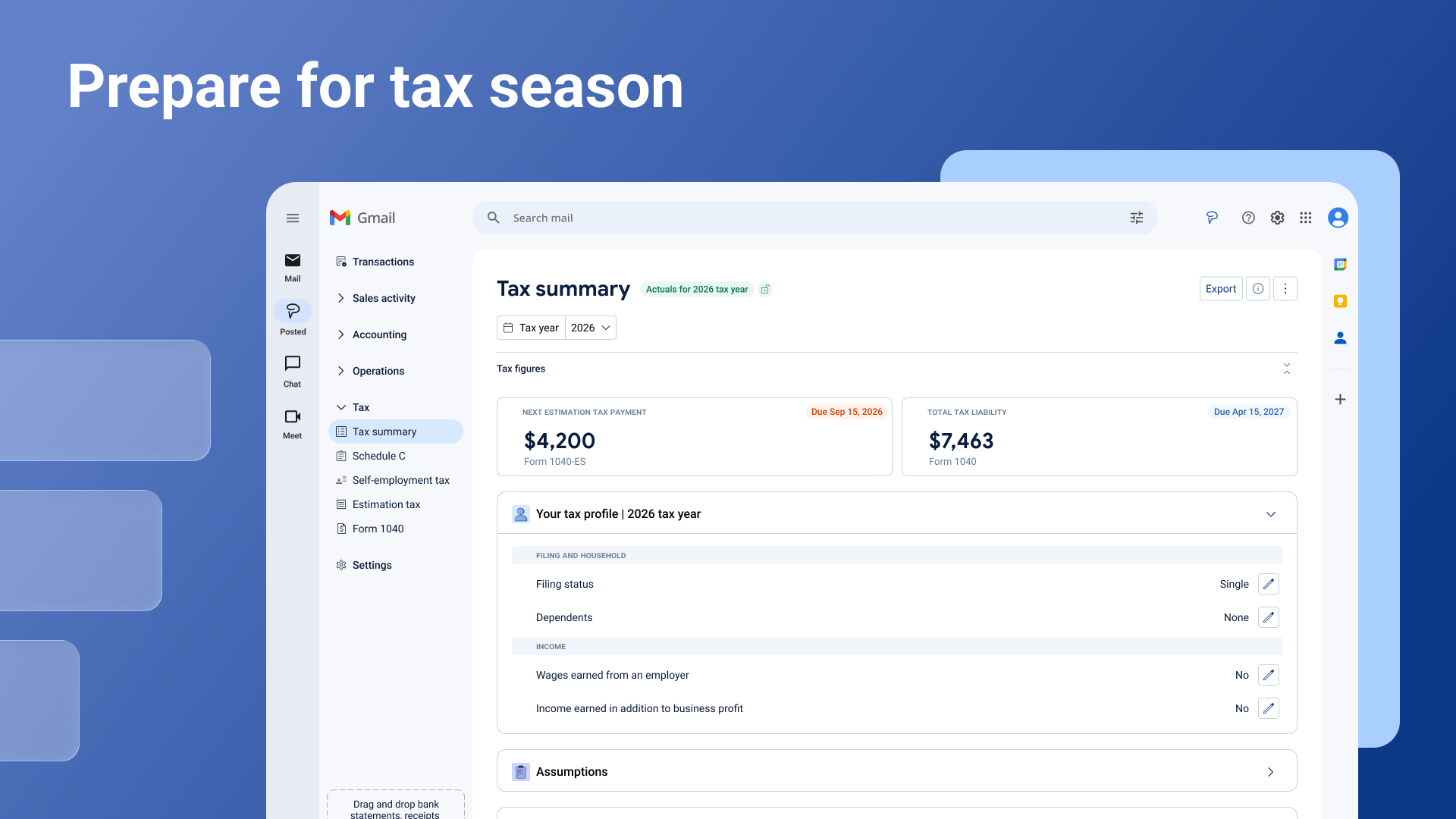
The Tax section takes everything already sitting in your books and turns it into the actual forms you deal with as a self-employed sole proprietor: your profit and loss, your self-employment tax, your quarterly estimated payments, and your income tax return. You don't need to build any of these from scratch. Posted keeps them updated as your transactions come in, and tells you when it needs something from you.
Where to find it
Open Tax from the left navigation menu. There are five pages: Tax summary, Schedule C, Self-employment tax, Estimated taxes, and Form 1040.
Your Business Feed will also surface tax items that need your attention, like confirming a deduction or logging some mileage. Clicking one takes you straight to the right spot, so you don't have to go hunting for it.
A few things that work the same way everywhere
Tax year and quarter. Every tax page lets you choose a tax year and which quarters to look at. By default, Posted shows every quarter that's started so far this year, and updates the figures as new transactions come in.
Actuals vs. projected. Most tax pages show actuals: what's actually happened in your books so far this year. Estimated taxes is the only page that projects forward, because that's built to help you plan ahead.
Show all lines. Each page opens with a simplified view showing only what's relevant right now. Turn on "Show all lines" if you want the full, official IRS line-by-line breakdown instead.
Locking a tax year. Once you're confident your numbers are right, lock the tax year to stop any further changes. Posted won't let you lock a year until you've confirmed everything it still needs from you.
Exporting. Every tax page has an export button if you want to share figures with your accountant or keep a copy for your records.
Keep in mind these are the numbers currently reflected in your books, not a filed tax return.
Tax summary: your starting point
Tax summary is the first thing you'll see when you open Tax. It pulls together your profit, your self-employment tax, your next estimated payment, and your total tax liability, all in one place.
Your headline numbers. Two cards sit at the top: your next estimated tax payment (and when it's due) and your total tax liability for the year. Click either one to see the full breakdown.
Your tax facts. To save you from re-entering things Posted can already work out, it makes reasonable assumptions from your transactions, like your filing status, whether you have a home office, or whether you use a vehicle for business. You'll see these listed so you can confirm they're right, or fix them if they're not. Once you confirm one, it moves into "Your tax facts" so you always know what's being used to calculate your numbers.
Warnings. Posted also flags things worth a second look. That might be a contractor payment large enough that you may need to send them a 1099, an expense that usually shows up each month but hasn't lately, or a tax payment that landed in the wrong category. You can dismiss a warning if it doesn't apply, or click through to fix it.
Upload last year's return. If you upload your prior year's tax return, Posted uses it to sharpen this year's figures, including unlocking the safe harbor option on the Estimated taxes page.
Deadlines. A table of what's coming up, like your next quarterly payment and your annual filing date.
When you're ready to finalize a year, lock it from here. Locking also updates the headline cards to show what you actually paid, rather than what's due next.
Schedule C: your profit and loss
Schedule C is the IRS form that reports the profit or loss from your business, and it's where your income and expenses come together into a single net profit number. That number then feeds your self-employment tax and your Form 1040.
Schedule C is organized into five tabs, each showing whether it's complete or still needs something from you:
Income. Your gross receipts, any returns or allowances, and other income, rolling up to your gross income for the period.
Expenses. Your business expenses, grouped the way the IRS expects them: things like advertising, contract labor, insurance, office expenses, rent, supplies, and travel. A couple of these have their own guided setup:
Home office deduction. Choose the simplified method (a flat $5 per square foot, up to 300 square feet) or the actual expenses method (your actual home costs, scaled to the share of your home used for business). Posted calculates the deduction either way.
Motor vehicle deduction. Choose the standard mileage rate or actual vehicle expenses. If you use standard mileage, you'll need to keep a mileage log to back it up.
Meals. Meals are 50% deductible. You'll be asked to confirm that the meals you've claimed were genuinely for business.
Cost of goods sold. Only relevant if you sell physical goods. If you don't, you can confirm that and leave it blank.
Motor vehicle. A summary of the vehicle deduction you've set up on the Expenses tab, including which method you're using.
Other expenses. Smaller, specific categories like software subscriptions or bank fees that don't fit neatly elsewhere.
Any line with a small arrow next to it can be expanded to see the transactions behind it. From there, you can review, recategorize, or fix anything that doesn't look right, and the totals update automatically.
If you buy equipment or other assets for your business, Posted tracks them and works out your depreciation deduction for you. In some cases, you can deduct the full cost in the year you buy it rather than spreading it out. You'll be asked to confirm the details for each asset.
Self-employment tax
As a sole proprietor, there's no employer splitting Social Security and Medicare taxes with you, so self-employment tax covers that on your own. Posted calculates it directly from your Schedule C net profit: it applies the tax to 92.35% of your profit, at a combined rate of 15.3% (12.4% for Social Security, up to the yearly limit set by the IRS, plus 2.9% for Medicare on all of it). If your net earnings are especially high, an additional 0.9% Medicare tax applies above the threshold for your filing status.
You don't need to enter anything here. It's calculated automatically from Schedule C, and half of it is deductible, which flows through to your Form 1040.
Estimated taxes
Since nobody's withholding tax from a paycheck, the IRS expects you to pay estimated tax four times a year instead. This page is the only one in Tax that projects forward: it takes your income so far this year and estimates where you'll land by December 31.
Posted shows you two IRS-recognized ways to work out your payment, side by side, and recommends whichever is lower:
Regular installment method: 90% of your projected tax for this year, divided into four payments.
Safe harbor method: 100% of last year's tax, divided into four payments (110% if your prior-year income was above $150,000). This option needs last year's return uploaded first.
Below that, a payment schedule shows all four quarters, their due dates (April 15, June 15, September 15, and January 15), what you're estimated to owe, what you've actually paid, and whether each one's been paid. You can add proof of payment, like a receipt or a copy of the voucher you sent the IRS.
Form 1040
Form 1040 is your individual income tax return, and it's where everything else comes together: your business profit, your self-employment tax, and any other income or adjustments, resolving into one number, either what you owe or what you're getting back.
Along the way, it shows your adjusted gross income, your standard deduction, and your Qualified Business Income deduction (a deduction of up to 20% of your business profit that many self-employed people qualify for). It then works out your total tax, subtracts what you've already paid through withholding and estimated payments, and shows the result at the bottom: Amount you owe or Refund.
As with the rest of Tax, this reflects what's in your books right now. It's a live picture to help you stay ahead of tax time, not a filed return.