
Settings
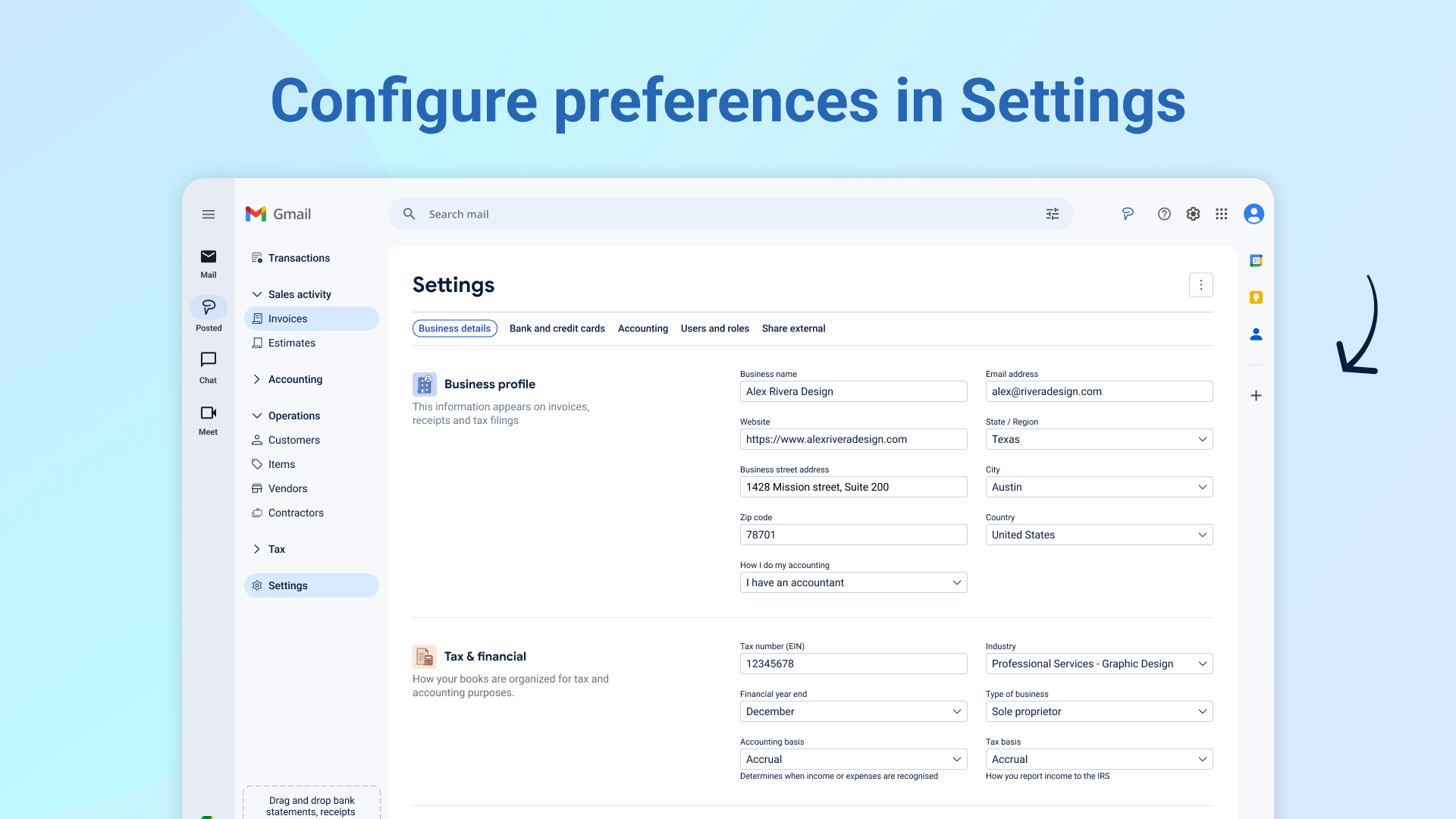
Settings is where you configure how Posted works for your business: your business details, tax basics, currency and date preferences, bank accounts, your categories, who has access, and sharing with your accountant.
Where to find it
Open Settings from the left nav. There are five tabs: Business Details, Bank and credit cards, Accounting, Users and roles, and Share external.
Only the account owner can see or use Settings.
Business Details
This tab covers three things.
Business profile. Your business name, email, website, and address, the same details that show up on your invoices and tax filings. You'll also find "How I do my accounting," where you can say whether you have an accountant or handle it yourself. Switching to "I have an accountant" doesn't do anything here directly, it just prompts your Business Feed to suggest sharing your books with them. If you're outside the United States, the tax-specific fields elsewhere in Settings gray out, since Posted's tax tools are currently built for US filers.
Tax and financial. Your EIN (optional here, since it often comes in through your inbox or a prior tax return instead), industry, and financial year end (December by default, which covers most small businesses). Type of business is currently set to Sole proprietor, with LLC support on the way. You'll also see two separate settings worth knowing apart:
Accounting basis (cash or accrual) changes how your profit and loss looks.
Tax basis (cash or accrual) changes how your tax reports are calculated.
Changing either only affects its own area. Your other reports aren't impacted by these choices.
Regional preferences. Your currency and date format, used consistently across everything in Posted.
Bank and credit cards
Every bank or credit card account Posted knows about lives here, whether it's connected through a bank feed, picked up from a statement, or added by hand, along with when it was last updated and where that update came from. Click an account's name to rename it.
Add an account yourself (enter the details, or upload a statement and let Posted fill them in), or connect one directly through Plaid so it updates automatically. If a connected account ever loses its connection, you can reauthenticate it from here.
Don't need an account anymore? Ignore it instead of deleting it. That stops new transactions from posting there, but leaves past transactions exactly where they are, and you can still move those to a different account if you need to. Reactivate an ignored account any time.
Accounting
This is your chart of accounts, the full list of categories your transactions get sorted into. Anything you add here shows up throughout Posted: in Journals, Transactions, your profit and loss, Operations, and Tax.
Add an account with a name, a category (Asset, Liability, Equity, Revenue, Direct costs, or Expense), and a more specific classification within that category. Use "Add additional account" to create several at once.
If you no longer need an account, archive it rather than delete it. An archived account can't be assigned to new transactions, but it stays visible in past reports for any period it was used, and you can still move old transactions off it if needed. Unarchive it whenever you want to start using it again.
Users and roles
Shows everyone with access to your Posted account. Right now, Posted supports a single role, so this simply confirms you have full access to everything.
Share external
Turn on link sharing to give your accountant a live view of your books, set a password, then copy the link to send along. For the full picture of what your accountant can see and do once they're in, see the "Share your books with your accountant" article.